
Hyundai Digital Key
Hyundai Motor AmericaAuto & Vehicles
3.7836.00 Reviews
- Version
- 1.0.31.3
- Installs
- 100.00K
- Age Rating
- Everyone
Screenshots
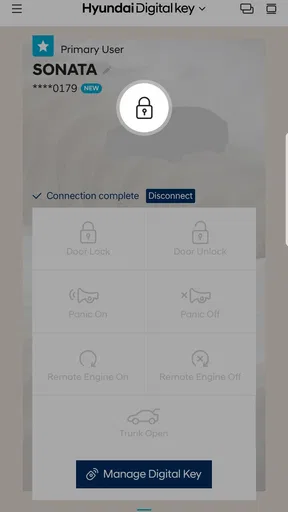
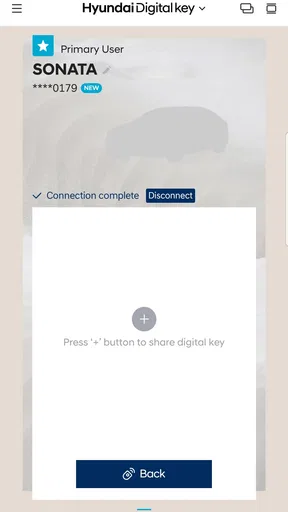
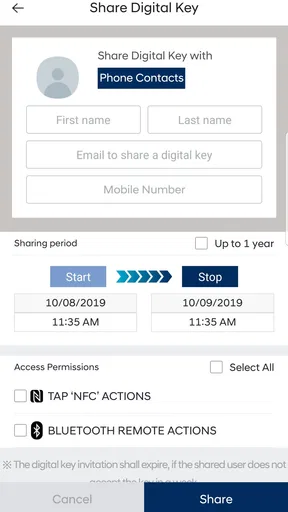
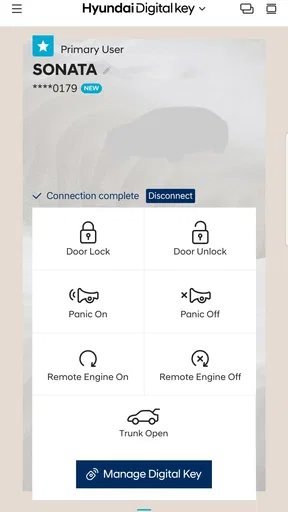
Our Review of Hyundai Digital Key
 Analysis by Appyee
I like the idea behind Hyundai Digital Key because it addresses a small but meaningful part of daily driving: using a compatible Android phone to access and control a compatible Hyundai vehicle. Rather than treating the app as a general car companion, I see it as a focused Auto & Vehicles tool. Its usefulness depends less on how many screens it offers and more on whether your particular Hyundai and phone work with the digital-key system.
That distinction matters. A free app can be an excellent convenience when it replaces the need to carry a separate key in the right situations, but it is not automatically useful for every Hyundai owner. I would recommend approaching it as a vehicle-specific access tool, not as a universal remote for any car. After looking at its purpose, practical value, limitations, and audience, I think it makes sense for drivers who already have a compatible setup and much less sense for people hoping to add digital-key capability to an unsupported vehicle.
How Hyundai Digital Key fits into everyday driving
The app is developed by Hyundai Motor America and is available at no cost. That makes the initial decision straightforward: there is no app purchase to weigh against the convenience it may provide. The more important question is compatibility. The store summary describes access and control through a compatible Android device, so the phone and vehicle are both part of the equation.
I would not install it expecting a broad catalog of Hyundai ownership tools. Its identity is narrower than a full maintenance, trip, or dealership application. The central experience is built around the relationship between your Android device and the vehicle. That focus is a strength when you want a digital key, because the app is not buried under unrelated features. It is also a weakness if you want one application to cover every aspect of ownership.
The app is rated for Everyone, which makes its audience broad from an age-classification perspective. In practical terms, however, the real audience is defined by vehicle compatibility and phone requirements. A family member, partner, or occasional driver may find it useful, but only if the vehicle’s digital-key arrangement supports that person’s device and access needs.
It runs on Android seven or later, and the current version is 1.0.31.3. Those details are useful when deciding whether an older phone can participate. Still, meeting the operating-system requirement alone should not be treated as proof that the complete digital-key experience will work. The vehicle model, its equipment, and the phone’s own capabilities remain important parts of the setup.
What the free price really means
The free price is one of the app’s clearest advantages. You can try the application without paying for a download, subscription, or upgrade inside the basic decision described here. That gives the app a low financial barrier, especially for an owner who already has a compatible Hyundai and Android phone.
At the same time, “free” should not be confused with universal access to the underlying vehicle feature. The app does not turn every Hyundai into a digital-key vehicle simply because it is installed. The value comes from using an existing compatible arrangement, so the sensible first step is to confirm that your vehicle is eligible and that your phone can participate before reorganizing how you carry or use your keys.
This is also why I would be cautious about judging the app by its price alone. A free download can still be inconvenient if setup is unclear, if a second driver cannot be added easily, or if you need a traditional key available as a backup. The financial risk is low, but the practical value can range from excellent to negligible depending on your car.
What using it feels like in a normal routine
Imagine leaving home for a short grocery trip. Your phone is already with you, while your physical key is in another jacket. If the Hyundai and phone are properly compatible, the digital-key arrangement can make that routine less dependent on remembering the separate key. That is the kind of everyday convenience I think the app is designed to provide: reducing one small item in a situation where your phone is already part of your routine.
A second useful situation is shared access within a household. One driver may prefer a physical key, while another is more comfortable using an Android device. The app can be considered as an additional access method rather than a complete replacement for every key. That approach is more realistic because it leaves room for a backup when a phone is unavailable, uncharged, replaced, or being used by someone else.
I also see a benefit for drivers who dislike switching keys between bags, work clothes, and travel luggage. The convenience is not dramatic every time you drive, but it can remove repeated small annoyances. In my view, digital access is most valuable when it quietly fits into an existing routine instead of demanding that the driver change everything about how the vehicle is used.
Where the experience can become less convenient
The main trade-off is dependency. A physical key is a dedicated object with one job. A phone is a multipurpose device affected by battery level, replacement, settings, and the general complexity of mobile technology. Even when the app works as intended, I would not treat the phone as the only access plan until I had tested the arrangement thoroughly in real life.
Setup is another area where expectations should stay reasonable. Digital-key applications often involve more than downloading an app, because the vehicle and phone need to recognize each other. I would set aside time to complete the process while parked at home, rather than attempting it just before an important appointment. Testing access, locking, and any available control behavior in a calm situation is a much better workflow than discovering a problem in a crowded parking lot.
Compatibility can also create frustration. The Android requirement tells you whether the operating system is within the supported range, but it does not answer every question about a particular handset or Hyundai configuration. If the app is intended for your vehicle, the installation is worth trying. If your car is older or lacks the necessary equipment, the app may offer little practical value even though it installs successfully.
There is a subtle trade-off for households with several drivers. A digital key may be convenient for the main owner but less simple for people who borrow the vehicle occasionally. Before depending on it, I would think through who needs access, whether everyone uses Android, and what happens when one person’s phone is unavailable. A system that works beautifully for one driver may be less suitable as the sole method for a family car.
How it compares with carrying a normal key
The usual alternative is not another app; it is the physical vehicle key. That option is familiar, independent of phone battery, and easy to hand to another person. Hyundai Digital Key has the advantage of reducing the number of objects you need to carry, but the physical key remains the simpler choice for drivers who want predictable access without thinking about phone compatibility.
Compared with a general vehicle-owner app, this application also appears more specialized. A broader app may be preferable if your priority is maintenance information, service interactions, vehicle records, or other ownership tasks. Hyundai Digital Key is the better fit when the specific goal is phone-based vehicle access and control. Choosing between them should begin with the task you want to solve, not with the assumption that every Hyundai app serves the same purpose.
There is also a difference between convenience and coverage. A conventional key works as long as you have the correct key. A digital key can be more convenient in a phone-centered routine, but it introduces an extra compatibility layer. For me, that makes the app a useful complement rather than an automatic replacement. I would keep a dependable fallback until I had enough experience to trust the phone-based method for my normal trips.
Small decisions that make the app more useful
My first practical tip is to test the app before an urgent drive. Complete the setup at home, then try the vehicle access routine several times. Test it when the phone is in the place where you normally keep it, not only while holding it directly in front of the car. This gives you a better sense of whether the workflow feels natural for your habits.
Second, decide in advance what your backup will be. That might mean keeping the physical key available or making sure another trusted driver can access the vehicle through the normal method. This is not a criticism of the app; it is simply sensible planning for any phone-dependent tool. The convenience becomes much more valuable when it does not leave you stranded after a dead battery or phone change.
Third, treat phone replacement as a transition that deserves attention. If you move to another Android device, do not assume that the digital-key arrangement will carry over without any action. Recheck the setup before relying on the new phone. The same principle applies if multiple people share the car: each person should confirm their own access rather than assuming the primary driver’s configuration covers everyone.
Finally, be honest about your driving pattern. If you always carry a physical key and never find that inconvenient, the app may not change much for you. If you regularly leave keys behind, share a Hyundai with another phone user, or prefer keeping daily essentials on your phone, the convenience may be noticeable. The best value comes from matching the tool to a real recurring annoyance.
Who should install it and who should pass
I think Hyundai Digital Key is a sensible choice for a Hyundai owner who has a compatible vehicle, uses Android, and wants phone-based access as part of a normal routine. It is especially appealing to people who already rely heavily on their phone and would rather avoid carrying another small object whenever possible. Because the app is free, trying it is easier to justify when the compatibility conditions look promising.
It may also suit a household where one driver needs an additional access method but does not want a separate physical key permanently assigned to them. The important point is to plan access around real users, not just the owner’s phone. If several people need dependable entry, the household should test the arrangement with each relevant device and retain a fallback for occasions when digital access is impractical.
I would skip it if you do not own a compatible Hyundai, use a phone outside the supported Android range, or want a complete vehicle-management application rather than a digital-key tool. I would also hesitate to make it your only access method if you frequently lend the car to people who do not use Android or who are unlikely to complete a phone-based setup comfortably.
The app’s public reception is mixed but reasonably established: it holds a 3.7 average from around 4.9 thousand ratings, with more than 800 written reviews and over 100 thousand installs. Those figures suggest that plenty of drivers have tried it, while the less-than-perfect average is a useful reminder not to expect a frictionless experience in every vehicle and phone combination.
My final recommendation
My verdict is positive, but specifically for the right owner. Hyundai Digital Key offers a free way to explore phone-based access and control for a compatible Hyundai, and its focused purpose makes sense when that is exactly what you need. I appreciate that it can remove a small daily inconvenience without asking for a purchase, especially for drivers who already keep their Android phone close at hand.
I would not recommend installing it blindly or treating the app as a guaranteed replacement for a physical key. Confirm the vehicle and phone fit, complete the setup before you need the car, test the routine several times, and keep a backup during the adjustment period. Those steps address the most important practical risks without undermining the app’s central benefit.
For me, the decision is simple: if your Hyundai supports the feature and carrying a phone-based key would genuinely improve your routine, the free download is worth trying. If your vehicle is incompatible or you want broader ownership functions, a traditional key or a more comprehensive Hyundai application will be a better match. In that narrower role, this is a useful convenience app rather than an essential installation for every driver.
Verdict
Strengths of Hyundai Digital Key
- Unlock and start compatible Hyundai vehicles using your smartphone.
- Share a digital key with family members or trusted drivers.
- Works with supported NFC and Bluetooth-enabled smartphones.
- Convenient keyless access when carrying fewer physical items.
- Can provide a modern alternative to carrying a traditional car key.
Limitations of Hyundai Digital Key
- Only works with select Hyundai models, trims, and compatible phones.
- Setup may require vehicle pairing and following several configuration steps.
- Phone battery failure can prevent normal digital-key access.
- Compatibility may vary between Android and iOS devices.
- Some features may depend on vehicle equipment, region, or subscription services.
Other Releases by Hyundai Motor America
View All
MyHyundai with Bluelink
Productivity4.6
Similar Picks in This Category
View All
Android Auto
Google LLC4.1

maxim — order a taxi & food
PT. SITO4.7

Штрафы ГИБДД: проверка с фото
Pays LLC – Штрафы ГИБДД4.7

Номерограм – проверка авто
Авто Ассист4.8

Дром Авто
Дром4.9

Frequently Asked Questions
What is Hyundai Digital Key, and what does it do?
Hyundai Digital Key allows you to use a compatible smartphone as a virtual key for selected Hyundai vehicles. Depending on the vehicle, you may be able to lock and unlock the doors, start the engine, and share digital access with other people. The exact functions depend on your Hyundai model, trim level, market, phone, and supported connectivity technology.
Is my Hyundai vehicle and smartphone compatible with Hyundai Digital Key?
Compatibility is not universal, so you should check the official Hyundai compatibility list before downloading or setting up the service. Support can vary by vehicle model, model year, trim, country, and smartphone operating system. Some features may require NFC, Bluetooth, or ultra-wideband hardware, while certain Android and iPhone models may have different setup and functionality requirements.
Can I share my Hyundai Digital Key with another person?
On supported vehicles and devices, Hyundai Digital Key can let you share access with family members, friends, or other authorized drivers through the app or your phone’s digital wallet system. You can usually control the recipient’s permissions and revoke access later. However, sharing options, user limits, expiration settings, and available driving permissions vary by vehicle and software version.
Can Hyundai Digital Key start the car if my phone battery is low or the phone is offline?
The answer depends on the phone, vehicle, and digital-key technology being used. Some supported devices may continue working for a limited period after the battery becomes critically low, while other functions may require an active phone connection or a properly configured digital wallet. Before relying on the feature, Hyundai recommends carrying the physical key and learning the emergency access procedure.
Is Hyundai Digital Key safe to use as my only car key?
Hyundai Digital Key includes security features such as device authentication, encrypted communication, and the ability to remove shared users, but no digital system is completely risk-free. Protect your phone with a strong screen lock, keep the operating system updated, and avoid sharing account credentials. For emergencies, phone loss, low battery, or technical problems, it is wise to keep a physical key available.
